
小米路由器开启SSH,安装丰富插件
- 心得
- 2024-07-25
- 6热度
- 4评论
提示:时间很久了,作者的插件箱服务不稳定或已下线,谨慎使用
本次操作是参照网络文章的内容进行SSH解锁,也可以直接访问小米路由器官网SSH工具提示。
http://www.miwifi.com/miwifi_open.html
感谢各位作者的付出。
本文只提供便捷的链接和操作心得。详细操作请参看视频
本文以R3P为操作硬件,如有新硬件、新插件、新方法,将在本文内或本博客更新。
具有开发版固件的小米路由器
小米路由器AX9000
小米路由器HD
小米路由器Pro
小米路由器3
小米路由器3G
小米路由器青春版
小米路由器mini
小米路由器(R2D)
小米路由器(R1D)
这里有个提示
我之前的小米AC2100路由器是稳定版固件,但是可以解锁SSH,没有开发版固件的路由器版本请参看以下文章,尝试一下,不影响原有路由器系统。
有文章说要降级固件,然后开启SSH,因本人只有两个硬件AC2100和R3P,所以没有尝试降级后操作。
[postcard type="list"]733[/postcard]
一、刷开发版固件
开发板固件获取地址
https://www1.miwifi.com/miwifi_download.html
找到对应型号固件
二、正常设置网络
三、APP绑定路由器
四、开启SSH工具
https://www1.miwifi.com/miwifi_open.html
五、链接SSH
[postcard type="list"]744[/postcard]
以下仅做示例
六、安装插件
1、MT工具箱(带UI)
参看文章
[wxshow]
https://blog.csdn.net/u012872765/article/details/128069846
文章内显示支持以下小米路由器
支持硬件型号(更多型号在适配中):
小米路由器mini(R1CM)
小米路由器1D(R1D)
小米路由器2D(R2D)
小米路由器 3(R3)
小米路由器3D(R3D)
小米路由器3G(R3G)
小米路由器3P(R3P)
【MT工具箱 蜜罐版】一键安装脚本:
wget http://miwifi.miguan.vip/miwifi/MT/tools/install.sh -O /tmp/install.sh && chmod +x /tmp/install.sh && /tmp/install.sh【MT工具箱 蜜罐版】一键卸载脚本:
wget http://miwifi.miguan.vip/miwifi/MT/tools/install.sh -O /tmp/install.sh && chmod +x /tmp/install.sh && /tmp/install.sh uninstall提示:我利用小米路由器R3P进行的测试,可以正常安装,后台界面可以显示。但是如果重启路由器出现,后台的“MT工具箱”字样就没了。但是插件并没有被卸载。
2、ShellClash
参看文章
https://opclash.com/article/140.html
安装脚本(任选其一,不行就换,多次尝试)
sh -c "$(curl -kfsSl https://cdn.jsdelivr.net/gh/juewuy/ShellClash@master/install.sh)" && source /etc/profile &> /dev/null
export url='https://raw.githubusercontent.com/juewuy/ShellCrash/master' && sh -c "$(curl -kfsSl $url/install.sh)" && source /etc/profile &> /dev/null
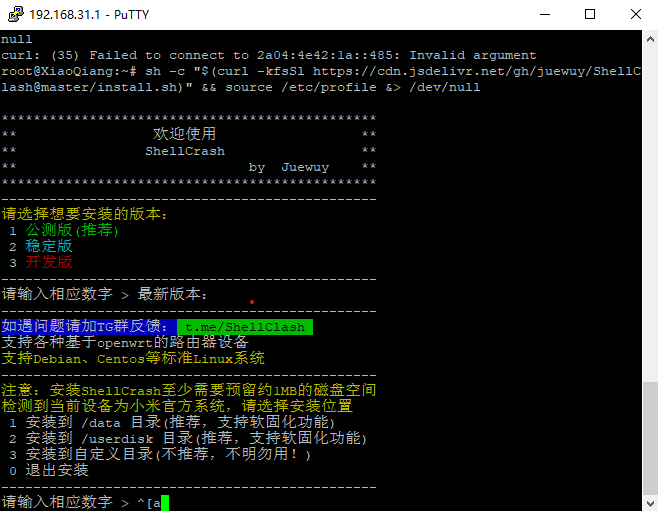
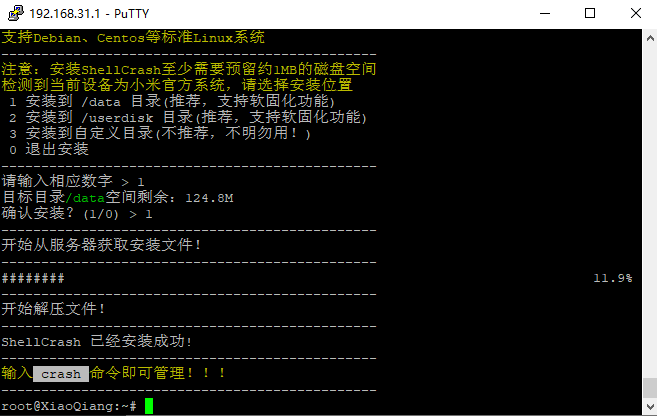
github相关内容
https://github.com/juewuy/ShellCrash/blob/master/README_CN.md
问题总结(仅供参考)
https://www.wifilu.com/2064.html
3、MIXBOX工具箱(SSH版)
参看文章
[postcard type="list"]733[/postcard]
安装脚本
sh -c "$(curl -kfsSl https://cdn.jsdelivr.net/gh/monlor/mbfiles/install.sh)" && source /etc/profile &> /dev/null如果下载不了尝试下面的命令
sh -c "$(curl -kfsSl https://raw.githubusercontent.com/monlor/mbfiles/master/install_github.sh)" && source /etc/profile &> /dev/nullhttps://www.right.com.cn/forum/thread-8322811-1-1.html
[/wxshow]
问题:如果通过路由器无法上网,又找不到原因
答:卸载插件,重启路由器。或者reset路由器
问题:设置了ShadowsocksR插件,之后一段时间无法上网,打不开网页
答:如果你设置的全局模式,当代理节点失效后,线路不通了就无法上网了。不设置全局模式就可以了。
重启后,工具箱链接没了。只有先卸载一下工具箱,然后又安装,刷新页面才又出现。有什么其它办法可以避免么?
点击“MT蜜罐版”出现这个页面
No page is registered at ‘/web/misstar/index’.
If this url belongs to an extension, make sure it is properly installed.
If the extension was recently installed, try removing the /tmp/luci-indexcache file.
博客密码
哲里木